Bulk Block by NameScrolling Reviews & RatingsVenom AI AssistantAlarms & Pinned ContactsSpidey AI & Call LogsSherlock AI SearchSocial ProfileMarketplace & 5 km RadarFiles & Google MeetPersonal Apps & Candy MatchAI Prompt GalleryWhoCaller Work CRMFamily Shield
Download free
Intelligent Phone OS | ★★★★★ 4.9 · 140,000+ Reviews

Some calls
change everything.

Personal. Family. Work. Social. Marketplace. Reimagined.
Block distractions, Protect your inner circle, Close works at lightning speed, Connect Fans and Earn Money

⬇ Download free See how it works ›
Happy person smiling and using WhoCaller on their phone
Zero AdsNo banners, ever
100% PrivateOn-device only
InstantZero-lag Caller ID
Core PlanFree forever
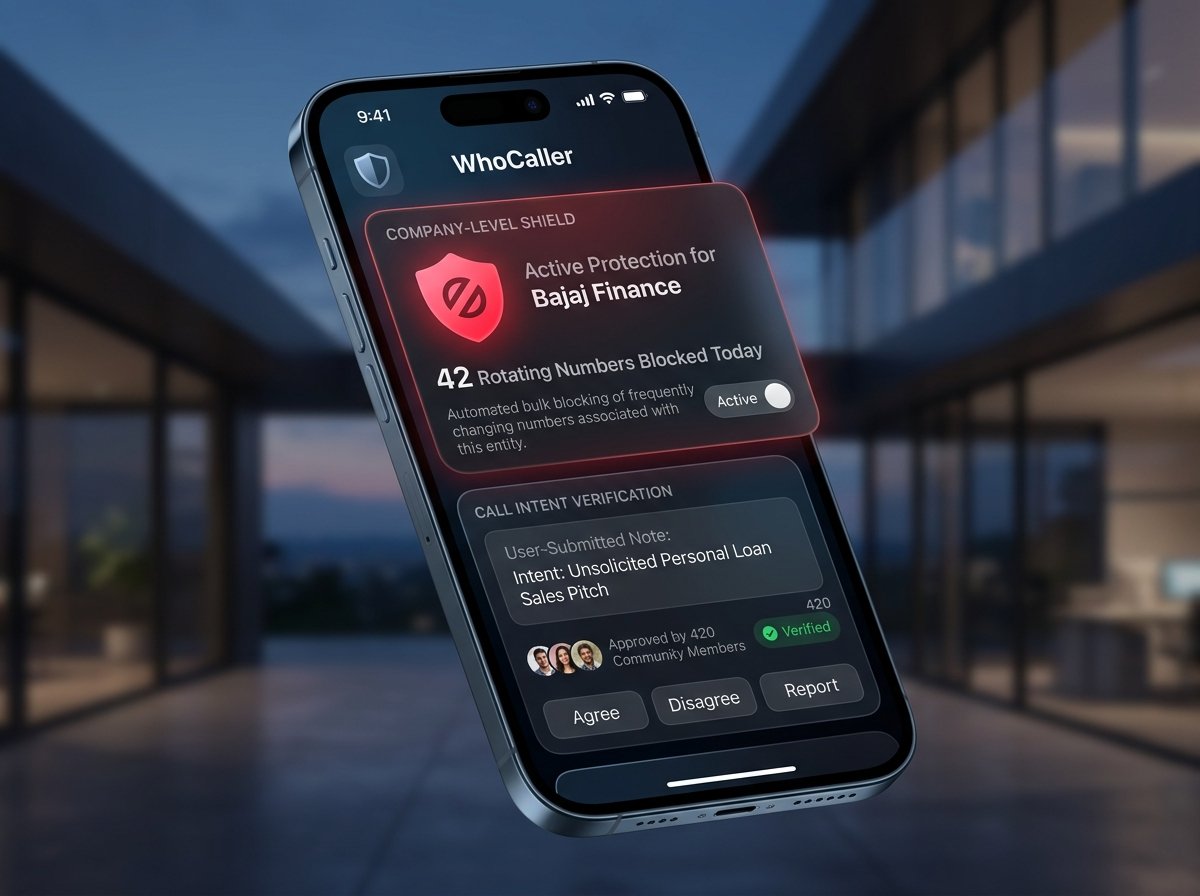
Company-Level Shield · Community Call Intent

Bulk Block using names.
Block entire companies and their rotating numbers.

When telemarketers cycle through dozens of rotating numbers, single-number blocking cannot keep up. WhoCaller identifies the organization behind the line — blocking at the Company Name level so every current and future number is silenced in a single tap. Complete with community-verified call intent, so you understand their purpose before you ever pick up.

Company-Level Bulk Block and Call Intent Verification on WhoCaller
Zero Distractions · Company-Level Silence
πŸ›‘οΈ 42 Rotating Numbers Blocked Today βœ“ Community Call Intent Approved

Stop rotating telecallers
at the company source.

Community-Approved Call Intent:

“Intent: Unsolicited Personal Loan Sales Pitch”

Verified for Bajaj Finance · Approved by 420 Community Members ✓
βœ“ Company-Level Immunity — block once, silence every number they cycle through
βœ“ Call Intent in Clear Text — read the caller’s true agenda before your screen lights up
βœ“ Community Verification — read and approve call intent to keep everyone informed
βœ“ Pure Silence — zero ringtones, zero screen wake-ups, effortless peace of mind
Start Company-Level Blocking Free →
Live Caller Trust · Community Feedback

Scrolling reviews and ratings
before picking up the call.

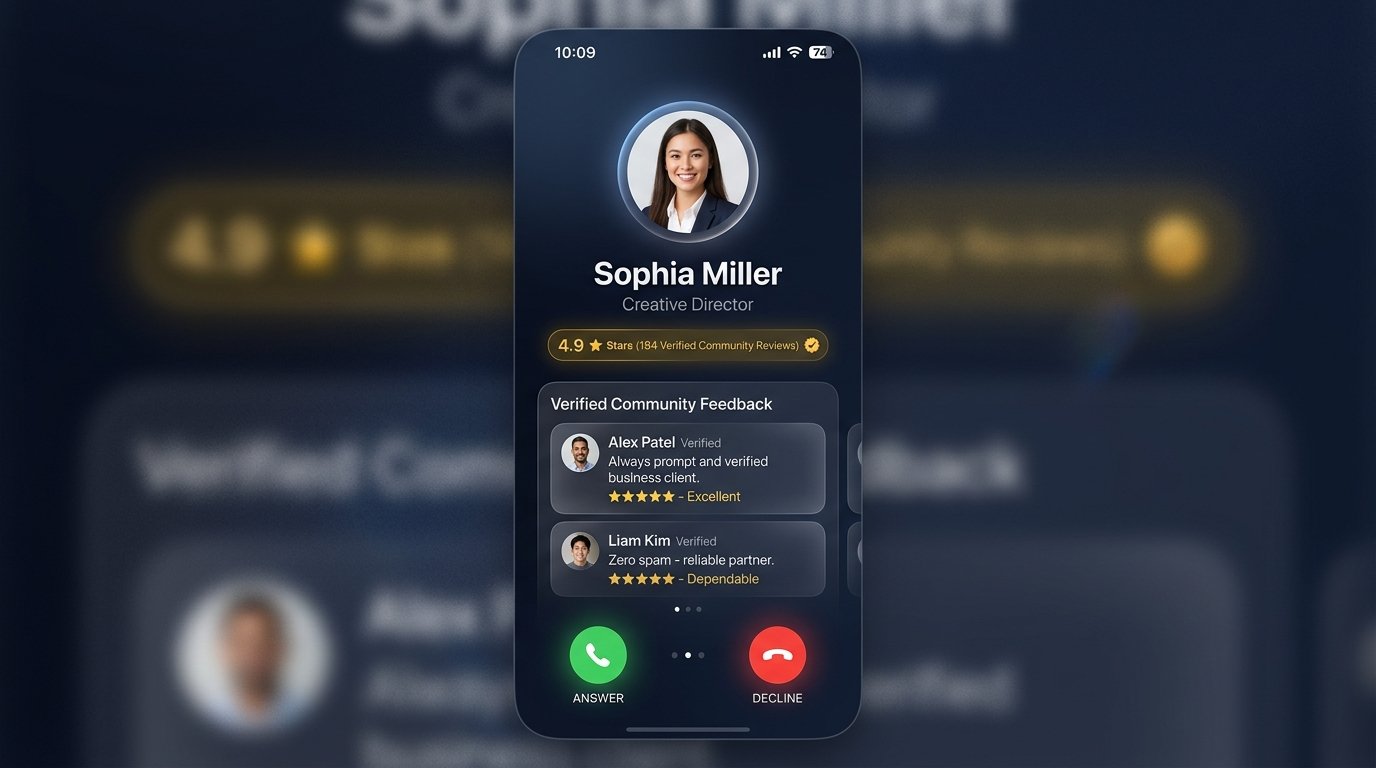
Every caller carries a reputation. As your phone rings, WhoCaller streams verified star ratings and authentic community reviews directly onto your call screen — giving you instant clarity before you decide to answer.

Live scrolling reviews and ratings on WhoCaller incoming call screen
Real-Time Community Stream
★★★★★
4.9 Stars (184 Verified Reviews) βœ“ Verified Community Feedback

Know their reputation
before you say hello.

“Always prompt and verified business client. Dependable service and zero spam.”

Alex Patel · Verified Reviewer · Rated ★★★★★

Authentic impressions from real recipients, delivered in real time. Know immediately whether it is an essential delivery, a trusted partner, or an aggressive sales pitch — before you say a single word.

See Verified Reviews in Action →
Incoming Call · Verified Entity
FedEx Express Courier
+1 (415) 890-2314 · San Francisco, CA
★ 4.9 (342 reviews) ✓ Verified Courier Priority Logistics
“Driver calls ahead before the lobby gate, adheres to apartment delivery notes, and treats fragile packages with care. Always polite!”
Reviewed by Marcus T. · Verified Recipient · 2 hrs ago
High Risk · Spidey AI Armed
⚠️ Aggressive Tax Scam
+1 (800) 241-9921 · Robocall VoIP Spoof
★ 1.1 (1,840 reports) ⚠ Auto-Silenced IRS Impersonation
“Automated bot threatening legal action and demanding immediate gift card transfers. Complete extortion attempt. Blocked instantly.”
Flagged by 1,840 WhoCaller Users · Spidey Radar Active
★
1-Tap Community Ratings

Rate any caller from 1 to 5 stars directly from your call screen or dialer. Your feedback helps protect millions in real time.

⚡
Instant Caller Recognition

Name, star rating, and verified history appear before the first ring completes. Never hesitate before answering.

🛡
Authentic Community Reviews

Every rating is backed by verified device owners. Automated bots, spam attacks, and artificial reviews are completely excluded.

Venom AI · Autonomous Executive Alter-Ego

Meet your AI alter-ego.
Whispers. Translates. Summarizes. Calls.

In a boardroom, behind the wheel, or at dinner with family. Venom AI acts as your tireless digital alter-ego — whispering caller context, translating cross-language conversations live, generating 1-sentence executive summaries, and placing autonomous follow-up calls so no commitment drops.

Venom AI Autonomous Alter-Ego showcasing Whisper Receptionist, Live Translation, Executive Summary, and Autonomous Calling
Executive Superpowers · 24/7 Autopilot
πŸŽ™οΈ Whisper Receptionist 🌐 Live Audio Translation ⚑ 1-Sentence Summaries

Your personal alter-ego.
Intelligent, discreet, and tireless.

Autonomous Alter-Ego Live Stream:

“Venom AI: Hi David, Sarah is in a meeting. How can we help? — Caller: Calling about the enterprise proposal timeline.”

Executive Summary: Client needs proposal sent by 4 PM · Priority High
Autonomous Action: Scheduled reminder logged · 1-Tap Take Over Call
βœ“ Whisper Receptionist — screens incoming callers in natural human voice with zero awkward pauses
βœ“ Live Audio Translation — translates cross-language calls seamlessly in real time
βœ“ 1-Sentence Executive Summaries — condenses lengthy calls into immediate actionable briefs
βœ“ Autonomous Calling — initiates automated callbacks and appointment confirmations for you
Activate Your Venom AI Alter-Ego →
Thoughtful Daily Tools · Built for Real Life

Pin to top, set call alarms,
color-tag contacts & play.

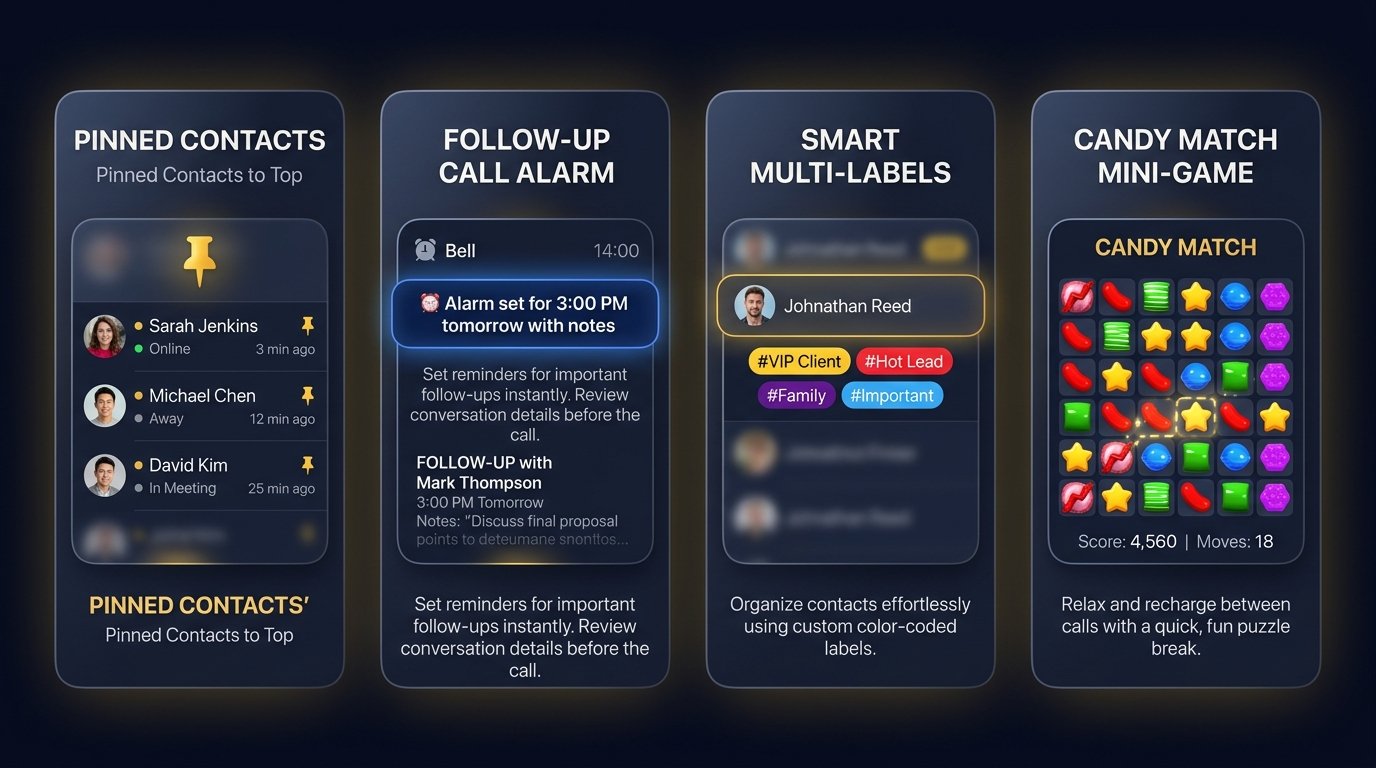
Designed around your actual day. Keep your inner circle pinned to the top, set follow-up alarms directly from your call history, organize contacts by color in less than a second, and take a quiet mental break with Candy Match between calls.

Pinned Contacts, Follow-up Alarms, Color Labels, and Candy Match Mini Game
Built for Real Life

Four thoughtful details
you’ll appreciate every day.

πŸ“Œ
Pinned Contacts to Top

Keep your inner circle — family, doctor, or key clients — anchored permanently to the top of your dialer and contact list.

⏰
Follow-Up Call Alarms

One tap in your call history schedules a reminder for 15 minutes, an hour, or tomorrow — with caller notes attached.

🎨
Smart Color Labels

Tag contacts in 0.8 seconds across seven material palettes. Instant visual classification without typing a word.

🍬
Candy Match Mini-Game

A delightful, ad-free match-3 puzzle game integrated into Personal Apps. Completely offline, instant, and battery-friendly.

Explore All Everyday Tools →
Spidey AI · Smart Call Logs & Work Velocity Engine

Spidey AI: Smart Call Logs.
Instant color pills. Zero typing.

Your call history, illuminated by visual intelligence. Every conversation is tagged across seven vibrant material color pills in under 0.8 seconds — from #VIP Client and #Hot Lead to #Courier and #Family. With dual operating modes: silence scam rings automatically or let revenue ring through instantly.

Spidey AI Smart Call Logs with multi-color semantic pills on WhoCaller
Visual Call Log Intelligence · 0.8s Triage
#VIP Client · Purple #Hot Lead · Amber ⚑ High-Velocity Mode Active

Know who matters at a glance.
Tag in 0.8 seconds without typing.

Traditional call logs are just endless lists of numbers. Spidey AI organizes your day with instant visual clarity. Tap once on the call screen to tag any contact with smart color pills — highlighting high-value clients, essential family, and deliveries the moment you look at your phone.

βœ“ Smart Call Log Pills — 7 material color tags (#VIP Client, #Hot Lead, #Office Work, #Courier, #Family, #Payment Due, #Spam Silenced)
βœ“ Under 0.8s Total Speed — 1-tap categorization directly from the dialer or call screen
βœ“ Dual Defense Engine — Personal Peace silences scams; High-Velocity lets clients ring
Organize Your Calls with Spidey AI →
πŸ›‘οΈ Spidey AI ON · Active Personal Peace Mode
Total Scam Silence

Aggressive scam radar silences fraudulent robocalls, tax impersonations, and spoofed fraud rings automatically before the first ring. Your screen remains serene.

Auto-Silenced Call Demo:
+1 (800) 241-9921 (Robocall) — Flagged by 1,840 WhoCaller members · Silenced with zero vibration.
βœ“ Zero nuisance interruptions · βœ“ 100% peace of mind
⚑ Spidey AI OFF · Active High-Velocity Work Mode
Never Miss a Paying Client

Running a business or awaiting priority deliveries? Auto-silencing steps aside so every client inquiry, courier, and partner rings through instantly, backed by live trust badges on your screen.

Open Reception Demo:
FedEx Courier / Unsaved Client — Rings through immediately with full verified credentials.
βœ“ Zero missed revenue · βœ“ Instant courier contact
Sub-1-Second Semantic Tagging · Zero Keyboard Typing

Tag callers in 0.8 seconds.
Recognize priority by color.

No typing required. A single tap during or after a call tags the contact across seven vibrant palettes — illuminating your call log with instant visual clarity.

#VIP Client · Purple #Hot Lead · Amber #Office Work · Blue #Family · Emerald #Courier · Teal #Payment Due · Indigo #Spam · Crimson
⚑
Under 0.8s Total Speed

One tap directly on the active call screen or post-call summary. Zero menus, zero dropdowns, zero address book friction.

🎨
Instant Visual Radar

When an incoming call arrives or appears in your history, the color badge stands out immediately. Recognize a VIP or priority follow-up at a glance.

πŸ”„
Live Multi-Device Sync

Tag a contact on your phone, and the status updates across your paired tablets and team workspaces in real time.

Sherlock AI · Forensic Identity Investigation

The private investigator in your pocket.
Phone. Email. Person. Business.

Most phone apps only see digits. Sherlock AI conducts deep forensic identity investigations in milliseconds. In a single tap, cross-reference registered corporations, verified executive backgrounds, business email domains, and security threat records before you answer.

Sherlock AI Forensic Identity Investigation HUD with scanner reticle analyzing unknown caller
Forensic Identity Dossier · Multi-Vector Intel
πŸ” Auto-Classification βœ“ Verified Corporate Entity β˜… 100% Clean Security Record

Complete identity clarity.
Before you say a single word.

Unmask the person and organization behind unknown inquiries. Sherlock AI queries five deep verification vectors simultaneously — validating corporate registries, executive roles, domain authenticity, and threat signals into one cinematic dossier card.

βœ“ Verified Phone & Line — corporate registration, telecom carrier, and community trust score
βœ“ Career & Business Footprint — company director registries and professional executive credentials
βœ“ Security & Origin Radar — threat radar screening, city origin, and clean safety record
Search with Sherlock AI Free →
πŸ” Auto Detect πŸ“± Phone Number βœ‰οΈ Email Address πŸ‘€ Person & Business 🌐 City & Location
⚑ Search any phone, name, email, or city... Instant Recognition Active
Zero Waiting Time
πŸ“± Verified Business Line Trusted Clean Record
+1 (415) 890-2314
Apex Capital Logistics LLC

Registered commercial corporate entity. 4.9 community trust score with 342 verified on-time deliveries.

Direct Call WhatsApp Message + Note
βœ‰οΈ Verified Work Email Security Checked
marcus.vance@vanguard.com
Official Corporate Domain (vanguard.com)

Verified company mailbox. Clean security record with zero reported identity fraud or credential leaks.

1-Tap Email Safety Verified Save Contact
πŸ‘€ Executive Profile LinkedIn Linked
Dr. Aris Thorne
Managing Director · BioVenture Partners

Confirmed registered director. One tap brings up professional career credentials and official company records.

πŸ’Ό LinkedIn Profile Company Search Save Contact
🌐 Caller Origin Location Verified
San Jose, California
Silicon Valley Commercial Provider

Identifies genuine geographic origin and carrier. Automatically flags fake number spoofing and offshore robocall centers.

City Location Safety Check View Details
Quick Tools: 🌐 Web Search πŸ’Ό Work Profile πŸ›‘οΈ Safety Check πŸ“ Private Notes πŸ” Saved Documents
πŸ“‹ 1-Tap Summary
⚡
Instant Live Intelligence

Zero waiting. Verified identities, caller history, and community trust scores load in a fraction of a second.

🕵
One Search for Everything

Enter whatever information you have — a number, an email, or a business name. Sherlock connects the dots automatically.

🛡
100% Private & Invisible

Verify unknown callers with absolute peace of mind. Your searches are never logged, tracked, or shared.

WhoCaller Social · Public Verified Trust Profile

Your verified social profile.
Check your ratings. Share your trust.

Every professional, creator, and business owner receives an elegant, verified public profile (whocallerapp.com/u/yourhandle). Check your community star rating, view authentic client recommendations, and share your verified reputation card with friends and business partners.

WhoCaller Social Profile showing verified rating, authentic reviews, and share profile button on smartphone
Verified Public Reputation
whocallerapp.com/u/yourhandle ✓ Verified Checkmark β˜… 4.9 Stars (142 Reviews)

Build real trust.
Share with friends & business.

Let your reputation introduce you. Your WhoCaller Social Profile brings together your community trust score, verified client recommendations, and direct links for LinkedIn, WhatsApp, and Instagram. Tap “Share Profile” to send your verified digital card in one second.

🔒 Your Address Book Stays Yours. Forever.

Legacy caller ID apps secretly harvest your private contacts and upload your friends and family’s phone numbers to public directories. WhoCaller Social is 100% opt-in: your address book remains strictly on your device and is never uploaded, sold, or shared.

WhoCaller Marketplace · Hyperlocal AI Radar

Ask in plain English.
Connected in seconds within 5 km.

Need a trusted plumber, electrician, tutor, or technician right now? Type what you need in plain words. WhoCaller AI alerts verified WhoCaller profile holders within a 5 km radius. The first to accept locks the request — immediately closing it for others — and tracks live delivery status directly in your Marketplace menu.

WhoCaller Marketplace Hyperlocal AI Radar connecting plain-English requests to verified profiles within 5 km with instant job lock and WhoCaller Work CRM status sync
Hyperlocal AI Radar · Work Velocity
⚑ 5 km Hyperlocal Radius βœ“ First-to-Accept Instant Lock πŸ’Ό WhoCaller Work CRM Linked

Add your profile to search.
Win jobs the second they happen.

WhoCaller Marketplace turns your verified public profile into an instant local business engine. Professionals list their page (whocallerapp.com/u/yourhandle) to receive nearby job alerts, while neighbors get fast, dedicated help without browsing endless directories or battling bidding wars.

💼 For Verified Professionals & Businesses

Add your WhoCaller profile page to Marketplace search. When someone in your 5 km radius types “need electrician” or “plumber for leak”, your phone alerts you immediately. Tap Accept to claim the job exclusively. The inquiry number drops right into your WhoCaller Work CRM so you can manage notes, quotes, and progress until delivery.

📡 For Requesters & Homeowners

Simply type what you need in plain English. As soon as the first nearby professional accepts, the job locks exclusively to them — closing for others so you never receive spam calls. Track live request status (Accepted, En Route, In Progress, Delivered) directly in your WhoCaller Marketplace menu.

Join WhoCaller Marketplace →
💬
Plain English Search
Type naturally without filling forms or scrolling categories — like “need plumber for kitchen leak” or “electrician for switchboard”. AI parses your exact request in seconds.
Zero Forms · Pure English
📡
5 km Hyperlocal Radar
Instant notification alerts reach verified WhoCaller profile owners within a strict 5 km radius, ensuring someone nearby can arrive fast when time matters.
5 km Radius · Nearby Pros
🔒
First-to-Accept Lock
The first verified pro to accept locks the request exclusively. The enquiry closes immediately for all other providers — zero bidding chaos, zero endless spam calls.
Instant Lock · Zero Spam
💼
WhoCaller Work CRM Sync
The customer's inquiry number flows straight into the pro’s WhoCaller Work CRM. Requesters track live delivery stages directly inside their Marketplace menu.
Live CRM · Status Tracking
Personal Apps Ecosystem

An entire utility suite.
Zero bloat. Zero ads.

Everything you need, built directly into your phone. WhoCaller brings essential personal productivity tools together into a unified, elegant system — completely free, on-device, and private.

📥
WhatsApp Status Saver
Save photos and high-definition video directly to your gallery in a single tap. Fullscreen preview, instant sharing, zero watermarks.
WhatsApp · Free
💬
WhatsApp Direct
Message any phone number on WhatsApp or WhatsApp Business without saving them to your contacts. Keep your address book clean and organized.
Direct Connect
🔒
Notes & Document Vault
Keep private notes, client agreements, invoices, and receipts filed by contact, secured behind your fingerprint or Face Unlock.
Fingerprint Locked
🎥
Smart Video Alarms
Wake up naturally with an incoming voice call or gentle morning stretches that ensure you never oversleep.
Wake-Up Routine
🥗
Smart Calorie Lens & Health
Snap a photo of any meal for instant nutrition insights, paired with effortless daily tracking for water intake and steps.
Instant Photo Lens
🎨
Caller Theme Studio
Personalize how incoming calls look on your screen. Choose between sleek Cyberpunk Neon, 24K Luxury Gold, or minimal aesthetics.
Custom Call Screen
📷
Smart Document Scanner
Turn your camera into a crisp document scanner with automatic edge detection and clarity boost, filed directly under each contact.
1-Tap PDF Scan
🎓
Professional English Coaching
Refine your executive speaking confidence for high-stakes business discussions, client calls, and leadership presentations.
Speaking Confidence
✨
AI Prompt Gallery
Ready-to-use conversation scripts for polite screening, welcoming greetings, and quick post-call WhatsApp summaries.
Explore Prompt Library →
Smart Alarms & Calendar

The alarm you actually
can’t ignore.

Wake up to an authentic voice call, gentle morning movement, or timely client callback reminders. Thoughtfully designed to start your day with purpose.

Set your first alarm →
📞
1. Smart Voice Call Alarms

Simulates an incoming phone call to wake you naturally. Your brain responds instinctively, bypassing loud alarm buzzer fatigue.

🏃
2. Motion AI Video Alarms

Camera-verified morning movement — from gentle stretches to morning exercises — ensuring you are fully awake before the alarm turns off.

⏰
3. Scheduled Follow-Up Alarms

Never miss an agreed client callback or family promise. Set prompt alarms bound directly to specific contacts with one-tap dialing.

📅
4. Unified Calendar Planner

A synchronized monthly and daily planner built right into your dialer. View scheduled calls and follow-ups in one clean overview.

Contact Power Suite · Intelligent Communication

Files by person's name.
Instant Google Meet. Notes on any number.

Every contact holds an ongoing relationship. Attach encrypted agreements, grant document access in one tap, launch instant Google Meet video rooms, and keep private notes filed securely under each caller’s number.

πŸ“
Files by Name
Documents by Person

File client agreements, estimates, receipts, and important documents directly under that person's name and mobile number. Generate secure download links to grant access in one tap.

Pop-Up On Incoming Call:
When they ring, their contracts and estimates appear on your screen before you even answer.
βœ“ 1-Tap Secure Download Links · Encrypted Vault
πŸ“Ή
Google Meet
1-Tap Instant Google Meet

Need face-to-face clarity while on a call? Tap “Meet” right from your call screen. WhoCaller creates a private video room and shares the link in three seconds.

Voice to Video in 3s:
Seamlessly move from a phone conversation to face-to-face video with one tap.
βœ“ Zero app jumping · Instant face-to-face
πŸ“
Private Notes
Private Notes Under Each Contact

Never forget a client commitment, bank detail, or delivery instruction. Save private memos directly under any phone number with 1-tap quick tags like “⭐ VIP Client” or “πŸ’³ Payment Pending”.

100% On-Device Privacy:
Your notes remain stored safely on your phone. Never uploaded, never shared, completely confidential.
βœ“ Quick template chips · Zero cloud leaks
WhoCaller Work

Faster follow-ups.
Bigger deals. Zero lost leads.

WhoCaller Work transforms your phone dialer into a high-velocity sales CRM. The moment a call ends, trigger 1-tap WhatsApp quotations, track deal stages, and access documents indexed directly by mobile number.
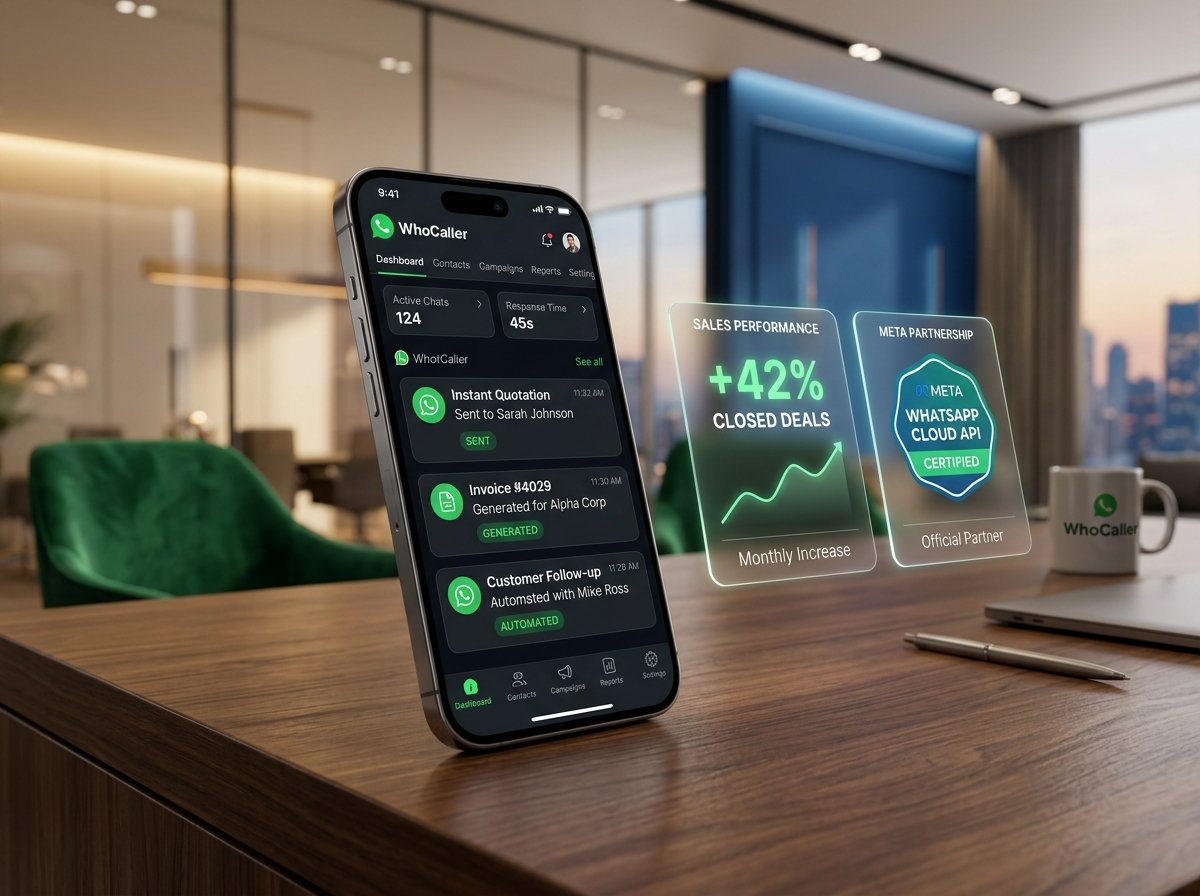
Business woman executing high-velocity follow-ups on WhoCaller Work
Post-Call Velocity

Call ends.
WhatsApp sent.
Deal closed.

Why lose momentum while switching between multiple apps? WhoCaller Work surfaces tailored WhatsApp quotation templates the exact second a call wraps up — moving leads forward in under three seconds.

βœ“ 1-Tap PDF Quotations βœ“ WhatsApp Shared Team Inbox βœ“ Work Webmail Lead → Hot → Client Field Staff GPS
Accelerate your sales pipeline →
📁
Documents by Mobile Number

Client agreements, PDF estimates, and conversation memos organized directly by phone number in an encrypted vault. Ready on your screen the moment they call.

⚡
Instant Post-Call WhatsApp Follow-Ups

Eliminate repetitive typing. Send customized pricing sheets and appointment confirmations on WhatsApp in one tap without saving numbers to your address book.

💬
WhatsApp Shared Team Inbox

A collaborative 2-way WhatsApp Business inbox for your team. Multiple colleagues manage customer conversations simultaneously from one business number with organized deal stages.

✉
Direct Business Email

Integrated email client built right into your dialer. Send branded proposals and review client email threads right beside your call history without jumping between apps.

💼
Pipeline Tracking & Annual Deals

Tag callers as Lead, Hot, Client, Won, or Renewal with visual badges on your dialer. Track deals, advance deposits, and service renewals with timely reminders.

📍
Field Team Location Radar

Real-time map coordination for delivery drivers and field staff. Coordinate routes, confirm client arrivals, and check team battery levels so everyone stays safe and on schedule.

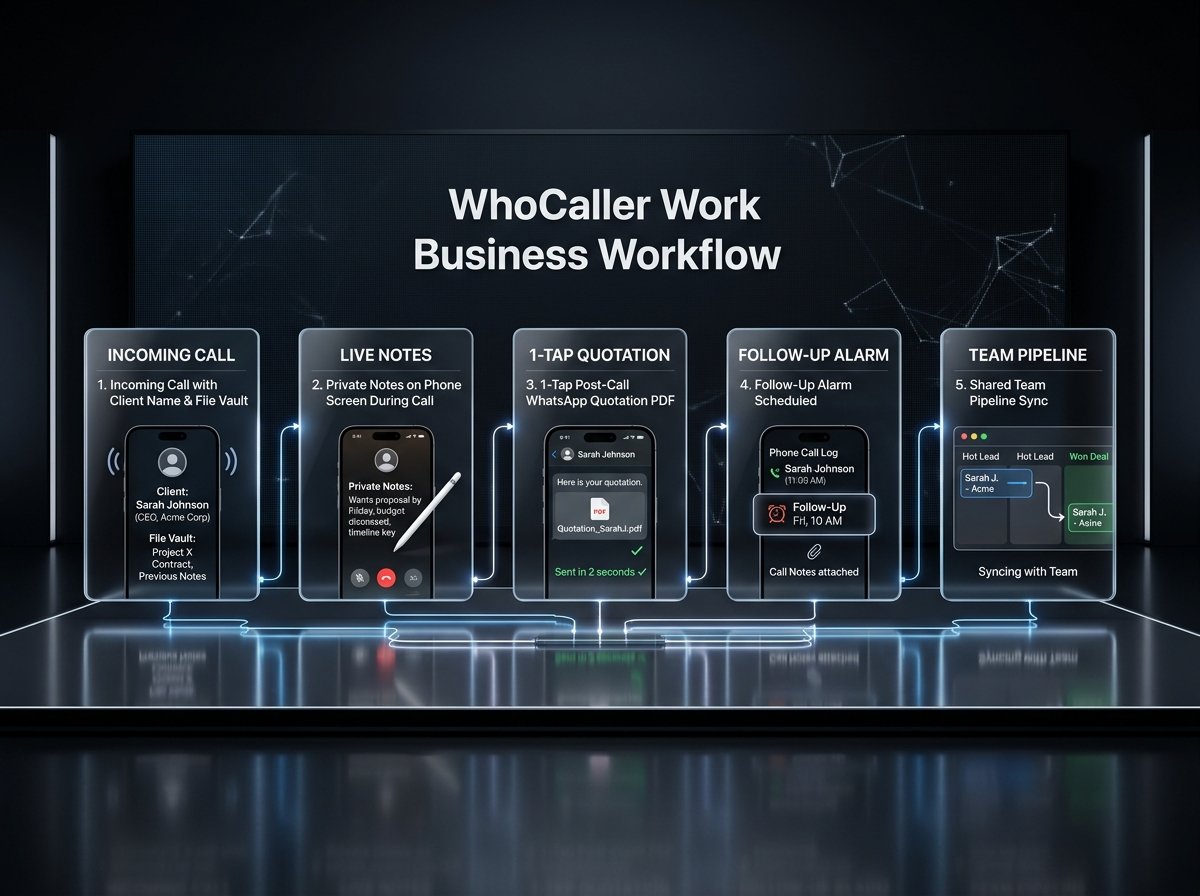
End-to-End Sales Pipeline · The WhoCaller Work Workflow

The complete 5-step workflow.
From first ring to closed deal.

Leave behind fragmented tools and manual spreadsheets. WhoCaller Work streamlines every client interaction into five fluid stages, managed directly from your dialer.

WhoCaller Work 5-Step Business Workflow Diagram
Step 1
Incoming Call & Vault

Identifies client credentials and surfaces past agreements & estimates right as the phone rings.

Step 2
Live In-Call Notes

Capture requirements and agreed terms on screen without interrupting the conversation.

Step 3
1-Tap WhatsApp Quote

Deliver professional quotations or confirmations on WhatsApp in under two seconds.

Step 4
Follow-Up Call Alarm

Schedule reminders directly from your call history with conversation notes attached.

Step 5
Team Pipeline Sync

Advance deal stages and synchronize updates across your shared team inbox in real time.
The word of mouth moment

“Wait, you
have to download this.”

Family Shield

Peace of mind
is a notification.

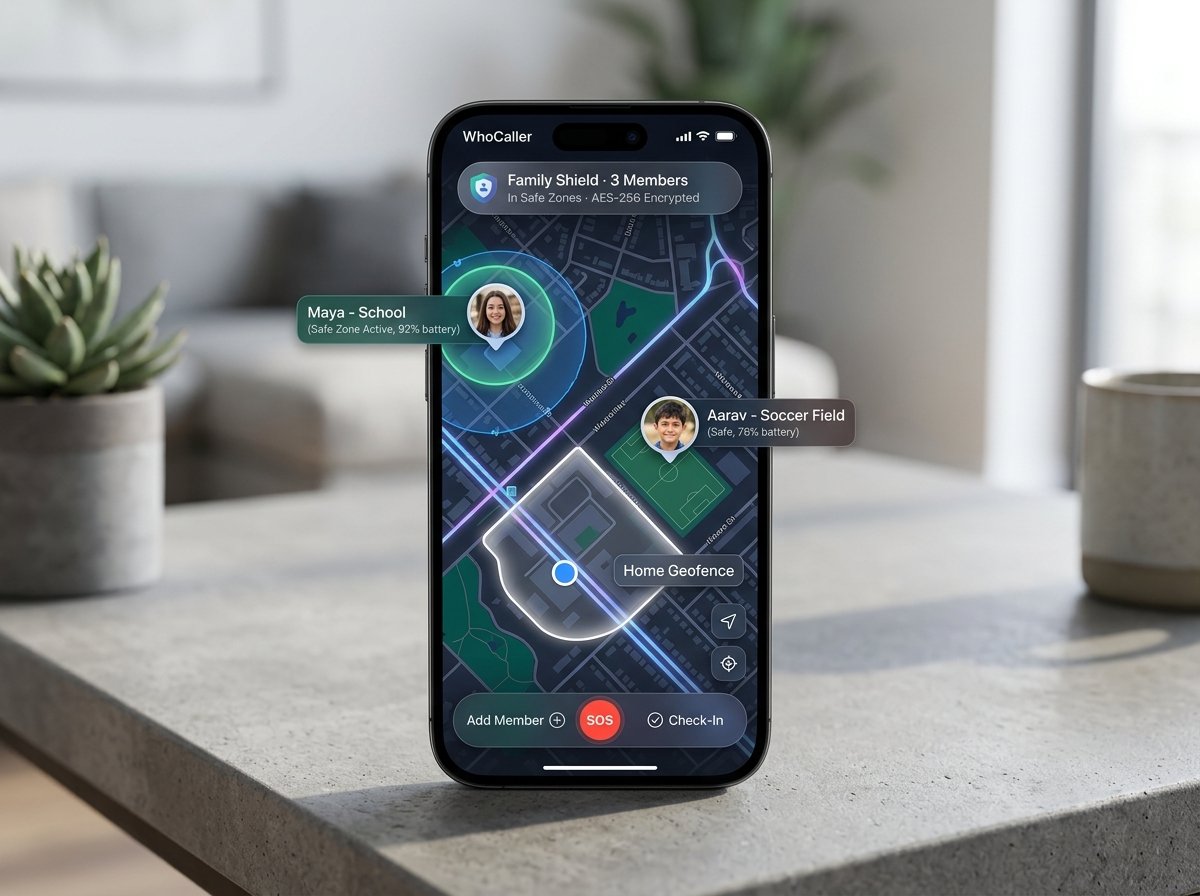
WhoCaller Family Shield GPS radar showing Maya at school and Aarav at soccer field in safe zones
For every family

Everyone
you love.
One map.

She left for school. You knew she arrived safely before she even sent a text. Live GPS radar with geofenced arrival alerts, battery levels, and 1-tap emergency assistance. Reassurance, without having to ask.

“Kids walk home alone now. I see them on the map and get a ping the moment they reach. Total peace of mind — I can’t go back.”
Mark & Sarah Jenkins · Parents of two · Austin TX ✓
● Live Family Radar Active Private & Encrypted Zero Data Resale
Keep your family safe →
Real people. Real moments.

Life after WhoCaller.

★★★★★
“Unknown numbers used to cause pause. Now I see their name, trust rating, and tags before I reach for my phone.”
DM
David Miller
Architect & Studio Lead, Brooklyn NY
★★★★★
“The second a call wraps up, a tailored quotation is on its way to the client via WhatsApp. It has completely transformed our turnaround time.”
CD
Charlotte Davies
Senior Property Consultant, London UK
★★★★★
“Kids walk home together now. I see them on the map and receive an alert the moment they walk through the door. Pure peace of mind.”
MJ
Mark & Sarah Jenkins
Parents of two, Austin TX
Questions

Straight answers.
No fine print.

How is WhoCaller designed for Personal, Family, Work, and Social Life excellence?+
WhoCaller seamlessly unites the four essential areas of daily life into one thoughtful phone operating system: (1) Personal Life: Total peace of mind with company-level bulk blocking, smart voice alarms, fingerprint-locked notes, and stress-free offline mini-games like Candy Match; (2) Family Life: Private real-time Family Shield GPS radar with safe zone arrival alerts and battery checks; (3) Work Life: High-velocity sales CRM with 1-tap WhatsApp PDF quotes, document vaults organized by mobile number, and a complete 5-step sales workflow; and (4) Social Life: Verified digital calling cards with community trust reviews and zero contact harvesting.
How does Company-Level Bulk Block work and how do I share and approve Call Intent in text?+
Commercial telecallers frequently rotate through dozens of different phone numbers. WhoCaller's Company-Level Bulk Block lets you block at the organization name level (e.g. “Bajaj Finance”, “Loan Telecaller”), automatically silencing all present and future rotating numbers from that entity. Additionally, users can state the caller's true intent in clear text (such as “Unsolicited Personal Loan Pitch”), which other community members can read, upvote, and approve so everyone stays informed before picking up.
What is the difference between Spidey AI and Venom AI?+
Spidey AI is purpose-built for faster work and high-velocity triage: its scam radar auto-mutes fraudulent robocalls in milliseconds, while its Work Mode allows paying clients and courier deliveries to ring through without screening delay, accompanied by 0.8-second contact color tagging. In contrast, Venom AI is designed for autonomous call screening and conversation analysis: it answers incoming calls in a natural voice when you are busy, inquires about the caller's purpose, analyzes true caller intent, transcribes speech live on your screen, and recommends 1-tap follow-ups (Take Over Call or Send WhatsApp Quote).
How does the 5-Step WhoCaller Work business workflow help me close deals faster?+
WhoCaller Work connects five essential sales steps directly to your phone calls: (1) Instant client recognition and document vault displayed as the call rings; (2) Live on-screen private notes captured during the conversation; (3) 1-tap post-call WhatsApp quotation sent in under two seconds; (4) Follow-up call alarm scheduled directly in your call logs; and (5) Real-time pipeline synchronization that updates deal stages and coordinates with your team's shared 2-way WhatsApp inbox.
How do Reviews & Ratings for unknown numbers work?+
When an unknown number calls, WhoCaller performs an instant lookup to display the caller’s community star rating (1.0 to 5.0 stars), total review count, community tags (e.g. “FedEx Delivery”, “Electrician”, “Suspected Scam”), and recent user feedback right on your incoming call screen. You can also rate any number with a single tap to protect others in your neighborhood.
What is WhoCaller Social and is my phone number exposed?+
WhoCaller Social gives you an elegant, verified digital profile (whocallerapp.com/u/yourhandle) showcasing your bio, verified checkmark, community star rating, and social links (LinkedIn, WhatsApp, Instagram). Unlike legacy caller ID services that secretly scrape and upload your phonebook contacts to public databases, WhoCaller is 100% opt-in: your private phone number is never exposed, and your address book is never uploaded or sold.
How does WhoCaller Marketplace connect me with nearby professionals?+
WhoCaller Marketplace connects local professionals and people who need help within a 5 km radius. Professionals can add their verified WhoCaller profile page to Marketplace search with one tap. Requesters simply type what they need in plain English — such as “need plumber” or “electrician for switchboard”. WhoCaller AI instantly sends high-priority alerts to verified profiles within 5 km. The first pro to accept locks the request, automatically closing it for everyone else to avoid spam. The inquiry number flows directly into the provider’s WhoCaller Work CRM pipeline, while the requester can check their Marketplace menu for live progress updates until the service is complete.
How does the WhatsApp 2-Way Shared Team Inbox work?+
WhoCaller Work includes a collaborative team WhatsApp inbox designed for businesses and sales teams. Multiple colleagues can handle incoming customer conversations simultaneously on one business number, organize lead stages, and send pre-saved message templates — eliminating duplicate replies and customer confusion.
What is Work Webmail and how does it integrate with phone calls?+
Work Webmail is a full business email client built right into WhoCaller Work. You can send branded email quotations, attach PDF proposals, and review client email threads directly from your call history and contact screen without jumping between apps.
How does Document Management by Mobile Number work?+
WhoCaller automatically organizes client estimates, contracts, PDF invoices, and notes directly under each person’s phone number in a private, secure vault on your phone. The moment a client calls, their complete file history is ready on your screen in one tap, so you always know their project terms before saying hello.
What tools are included in WhoCaller Personal Apps?+
WhoCaller Personal Apps is an ad-free utility suite built directly into your phone. It includes a 1-tap WhatsApp Status Saver, WhatsApp Direct messaging for unsaved numbers, a Private Notes & Document Vault, Motion Video Alarms, a Daily Health & Photo Calorie Lens, a Caller Theme Studio with custom designs, the Smart Document Scanner, and Professional English Coaching.
What is the Smart Document Scanner?+
The Smart Document Scanner turns your camera into a crisp scanner with automatic edge detection and enhanced contrast. It instantly scans receipts, business cards, and signed agreements into high-quality PDFs and organizes them directly under the relevant contact’s phone number.
What is Professional English Coaching?+
Professional English Coaching is an interactive speaking course built directly into WhoCaller Personal. It offers practical daily lessons for high-stakes business discussions, client calls, executive presentations, and professional email phrasing to help you communicate with confidence.
How does Sherlock AI help me verify unknown callers?+
Sherlock AI is an all-in-one search tool that lets you verify who is really calling. It covers 5 simple searches: (1) Auto-Detection that recognizes whatever you paste, (2) Phone numbers with registered business records, (3) Email addresses with account security verification, (4) Person and business names with professional career profiles, and (5) City location and network origin to spot fake number spoofing and offshore robocall centers. You can also export a 1-tap summary or save results to your private notes.
What is Spidey AI On / Off and how does it speed up work?+
Spidey AI gives you dynamic control over incoming spam defense with an instant 1-tap dialer toggle. When Spidey AI is ON (Personal Peace Mode), aggressive shielding actively auto-silences robocall bots, fake tax scams, and fraud rings so your phone stays quiet. When you are on duty or running business operations, toggle Spidey AI OFF into High-Velocity Work Mode. In Work Mode, aggressive auto-silencing is disabled so that every new customer inquiry, sales lead, courier delivery, and vendor call rings through instantly without screening delay — while still displaying real-time risk badges and ratings on your incoming screen.
What is the AI Prompts Gallery and how do I use it?+
The AI Prompts Gallery (accessible at whocallerapp.com/prompts.html) is a curated collection of ready-to-use conversation scripts. It includes specialized templates for polite call screening greetings, after-hours AI receptionists, friendly callback coordinators, objection handling, pitch scripts, and post-call WhatsApp quotation phrasing that you can copy in one tap.
How fast does 1-Tap Color Tagging work on incoming calls?+
Tagging a caller takes less than 0.8 seconds with zero keyboard typing. During an active call or on the post-call summary sheet, tap any color chip (such as #VIP Client in Purple, #Hot Lead in Amber, #Office Work in Blue, #Courier in Teal, #Family in Green, #Payment Due in Indigo, or #Spam in Red). Tapping any chip immediately classifies the caller and synchronizes across all your devices with zero delay.
Is WhoCaller free? What’s the pricing model?+
Core Caller ID, spam protection, smart call alarms, WhatsApp follow-ups, and Family GPS are completely free. No intrusive ads, banners, or data selling. Advanced business tools (Staff GPS Supervision and team coordination) operate on a transparent, simple basis with zero hidden fees.
How fast is the dialer with 10,000+ contacts?+
WhoCaller features an ultra-responsive T9 dialer designed to feel instantaneous. Whether you have 500 or 25,000 contacts, dialing and finding contacts happens instantly with zero lag or stutter.
What different types of alarms and calendar features are included in WhoCaller?+
WhoCaller features three distinct alarm models: (1) Smart Voice Call Alarms that ring your phone with a realistic incoming call to help you wake up naturally; (2) Motion Video Alarms that require a gentle morning stretch or exercise routine verified by your camera; and (3) Scheduled Follow-Up Call Alarms that automatically prompt you to dial clients or leads at agreed times. All alarms integrate with the unified in-app WhoCaller Calendar planner.
How does Hands-Free Voice Calling with Google Assistant work?+
You can initiate calls by speaking commands naturally (e.g. “Call Alex Smith” or “Call nine eight four zero...”). WhoCaller parses spoken numbers, confirms the contact, and dials hands-free with intelligent scoring to prevent misdialing wrong numbers.
How does Family Shield keep my children safe?+
Family Shield provides a private, live map showing your loved ones’ locations, customizable arrival alerts when kids arrive at school or home, battery level indicators, lock-screen SOS emergency buttons, and parental safety controls.
Does WhoCaller read my messages or share my contact book?+
Never. Your contacts and call logs are stored securely on your phone with bank-grade encryption. WhoCaller never reads private SMS or chat messages, never records conversations without permission, and never sells your data to advertisers. Privacy is built into everything we do.

Your phone,
finally alive.

⬇ Download free See how it works